DDH Software’s HandBase for iOS is old and creaky software – It mostly still works on modern hardware. I’ve been using it since the Palm Pilot. I recently discovered that trying to use the upload feature crashes Handbase for iOS. (as of 6-25-2026). Handbase for Mac does not work at all on modern Macs. That said, Handbase is still a useful db for iOS, and one of the very few retail db for iOS that can actually do math offline. But you’ll need to manage your expectations for modern features.
When a db gets too full it can break (too many records). So it is good to occasionally start fresh with an empty copy. You can retain old db records in the old copy of your DB. No need to delete the old db.
Assuming:
MacOS 10.15 Sequoia
iOS 26.4.1
HandBase v 4.9.088 2525.12.11 for iPhone
FireFox for Mac v 151.0.3
First: make a copy of the DB structure.
From the HandBase “Databases” page;
tap the + at bottom left.

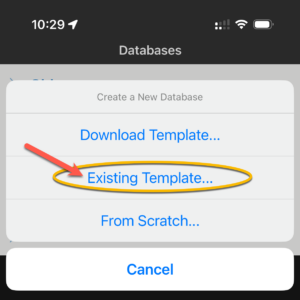
Create a new database → select: Existing Template…
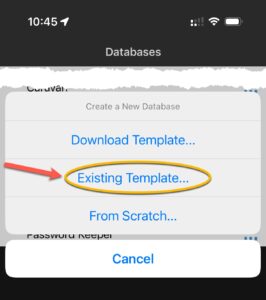
Name it. & save.
This creates a new copy of your existing DB. No records. But it does retain links to any other databases & I think it retains any forms. But no records. Perfect. You may be done.
I was not done because I wanted to import some data from my older copy of this db file.

You can use the HandBase built in server (launched from sync button icon at bottom right, picture is above) to xfer CSV data to your computer. That still works well. But in my limited experience, uploading PDB or CSV files to HandBase fails & crashes the iOS app. I’m not going into detail here about that, but it is easy to figure out after you push that sync button in iOS Handbase.
So do not erase from iOS any HandBase db files you might want later, because you may not be able to (easily?) send them back into HandBase for iOS.
Before uploading any CSV data, download a CSV file from your db so you can get the columns exactly correct. You need to do this now, there is no option later. You can use a spreadsheet app (such as LibreOffice or Excel) to edit the CSV data if needed.
To upload or import a CSV file into a particular HandBase file:
Email the CSV file to yourself.
Open the attached CSV file in iOS e mail app.
Tap the export button (arrow out of a box icon).
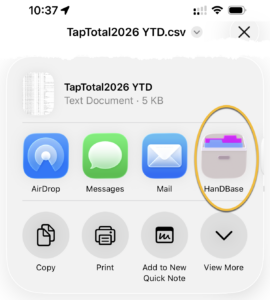
Select to open the attachment into HandBase (tap “More” … button if needed to see HandBase app).
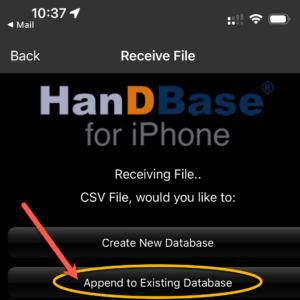
This will open the HandBase app with a choice of creating a new db or appending to an existing db.
Select “Append to existing Database”.
Select the db to append this CSV file to.
Check your data for accuracy. I found that some check boxes became checked during import, even though their value was zero.
This is not intended to be comprehensive manual, but hopefully will be helpful. I actually made this for myself as some notes I can find again for next time. Because I just spent way too long figuring this out after not doing export/import for a few years & discovering the upload part is not working anymore for me. And Duplicating a Handbase db is way more obscure then I expect.
If you know of a more modern offline database for iOS that can do basic math please let me know. 😃